Why you can trust Tom’s Hardware
Our expert reviewers spend hours testing and comparing products and services so you can choose the best for you. Find out more about how we test.
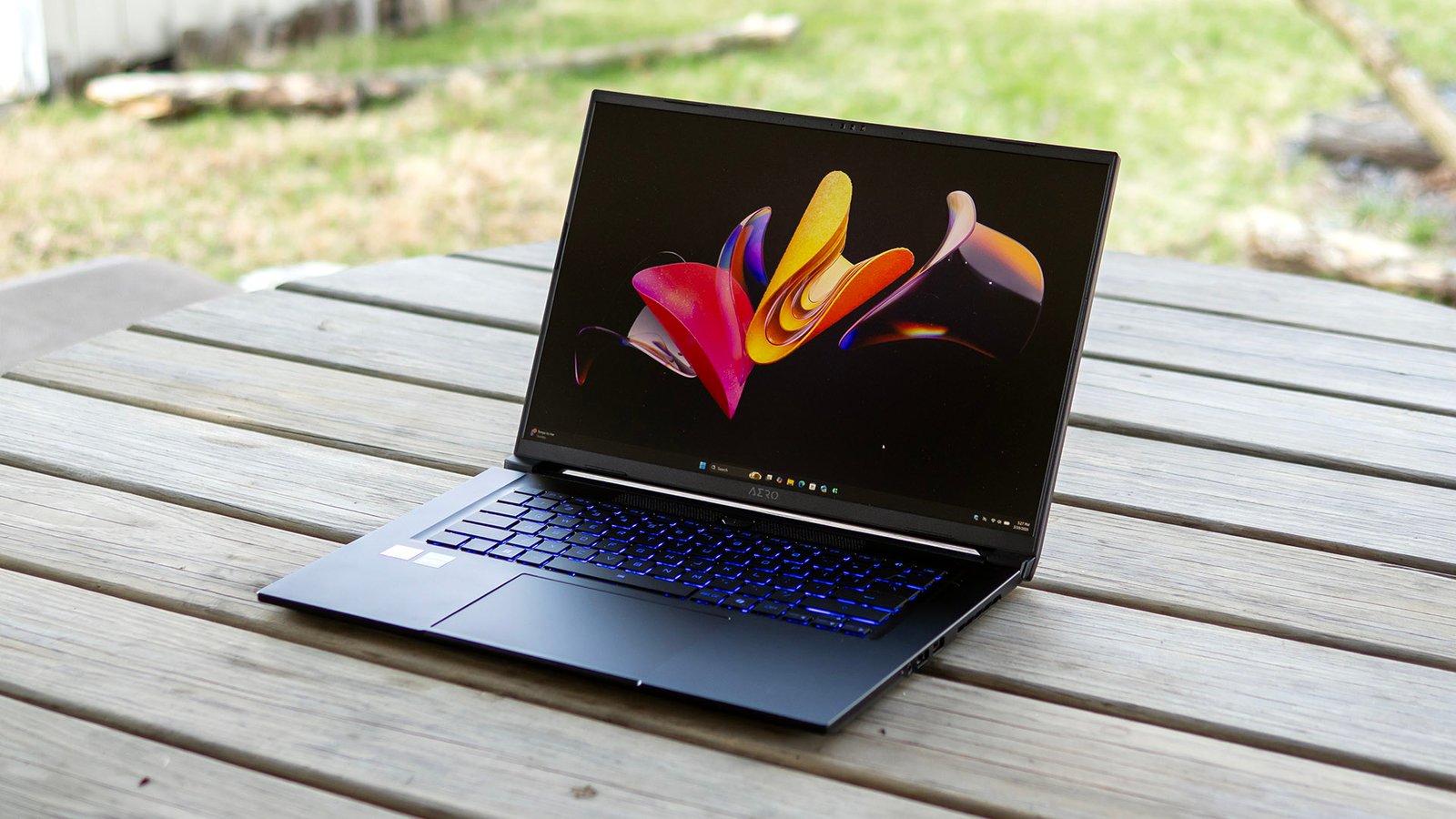
Gigabyte’s Aero X16 aims to be a do-it-all machine for gamers and creators alike, pairing an AMD Ryzen AI CPU and an Nvidia RTX 5070 graphics card inside a clean, professional-looking chassis. There is plenty to appreciate here, particularly its strong productivity performance and excellent battery life, though its average display and some shortcomings make it feel less modern than it should. While capable, it’s quite expensive for those looking for one of the best gaming laptops.
Design of the Gigabyte Aero X16
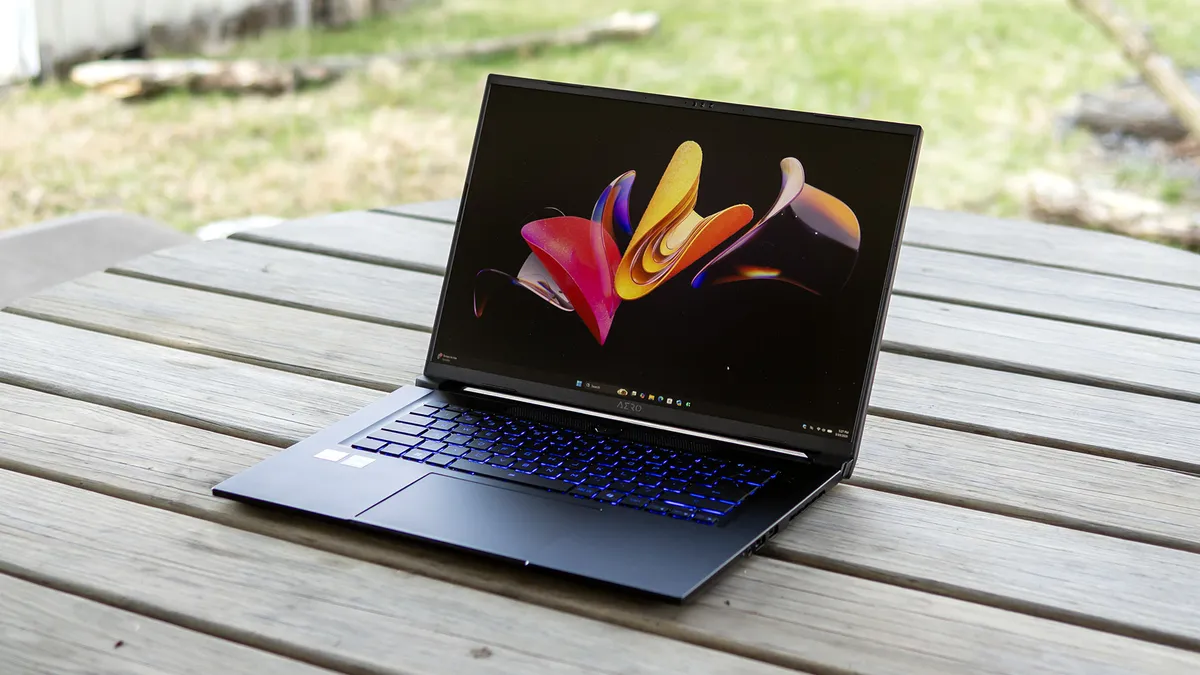
Measuring 14 x 9.9 x 0.78 inches and 4.2 pounds, the Aero X16 is shallower and significantly lighter than the Framework Laptop 16 (14.03 x 11.43 x 0.82 inches, 5.29 pounds with graphics module). The Acer Predator Trito 14 AI (12.68 x 8.84 x 0.71 inches, 3.5 pounds) is more portable, but it uses a smaller 14.5-inch display.
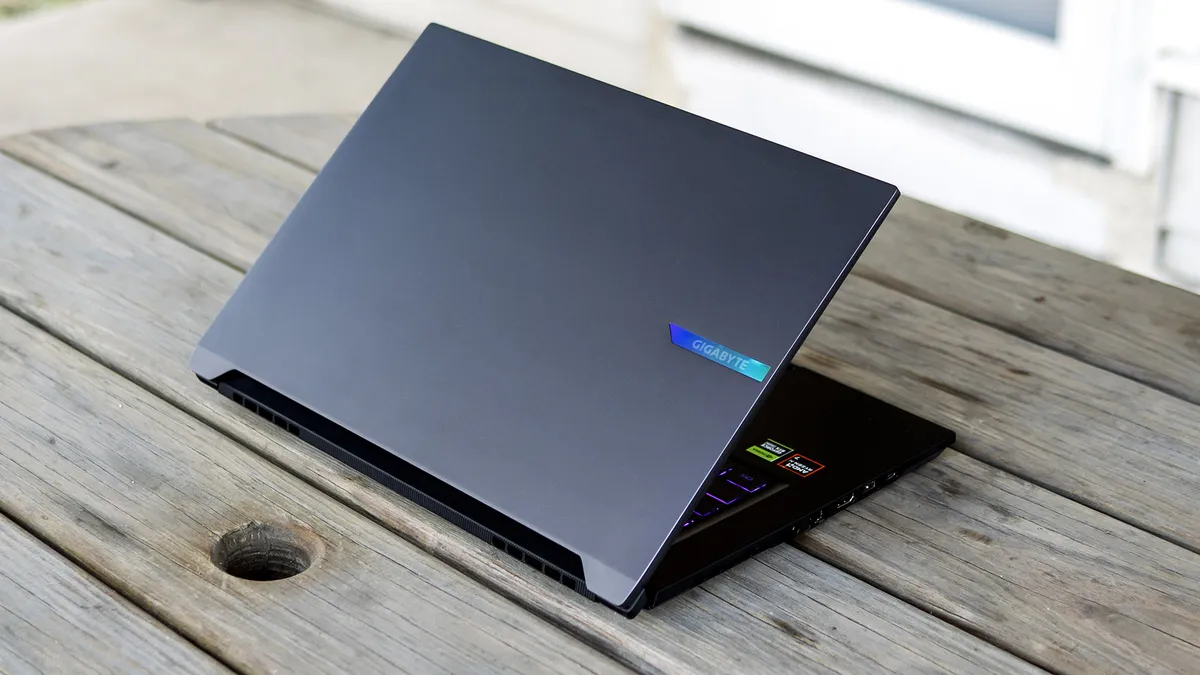
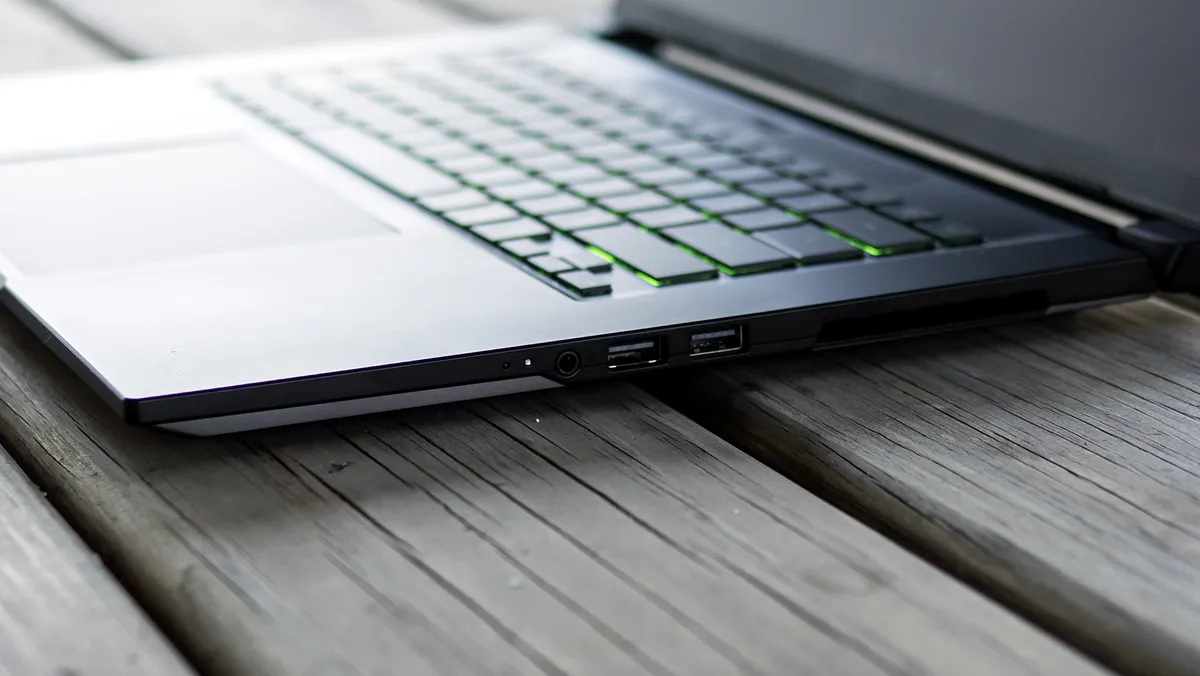
Gigabyte’s port selection is adequate, starting on the left with Ethernet, HDMI, USB-A 3.2 Gen 1, and USB4. On the right, you’ll find a 3.5 mm audio jack, another USB-A 3.2 Gen 1, and a USB 2.0. The barrel-style power connector and the legacy USB 2.0 port make the laptop feel less modern than it should. Internally, the Realtek 8852CE wireless card doesn’t help by only supporting previous-generation (albeit perfectly adequate for most users) Wi-Fi 6E and Bluetooth 5.2. A modern laptop in this price-range should have Wi-Fi 7.
Image 1 of 2

Gigabyte Aero X16 Specifications
|
CPU |
AMD Ryzen AI 7 350 |
|
Graphics |
Nvidia GeForce RTX 5070 (8GB GDDR7, 85 W TGP, 1,425 MHz boost clock) AMD Radeon 860M integrated GPU |
|
Memory |
32GB DDR5-5600 (2x 16GB) |
|
Storage |
1TB SSD (Kingston OM8PGP41024Q) |
|
Display |
16-inch, IPS, 16:10, 2560 x 1600, 165 Hz |
|
Networking |
Realtek 8852CE Wi-Fi 6E, Bluetooth 5.2 |
|
Ports |
USB4, 2x USB-A 3.2 Gen 1, USB 2.0, Ethernet, HDMI 2.1, 3.5 mm audio jack |
|
Camera |
FHD IR |
|
Battery |
76 WHr |
|
Power Adapter |
150 W, barrel connector |
|
Operating System |
Windows 11 Home |
|
Dimensions (WxDxH) |
14 x 9.9 x 0.78 inches |
|
Weight |
4.2 pounds |
|
Price (as configured) |
Gaming Performance on the Gigabyte Aero X16
Our Gigabyte review unit features a Ryzen AI 7 350 processor, a GeForce RTX 5070 rated for 85 W of total graphics power, and 32GB of RAM.
Playing Star Wars Jedi: Fallen Order with Epic settings at 2560 x 1600, I saw upwards of 100 frames per seconds outdoors and sometimes near 140 FPS, with only occasional dips into the mid-80 to 90 FPS range in firefights. Gameplay was fluid and stutter-free.
Our comparison systems include two other creative-centric gaming laptops: the Acer Predator Triton 14 AI (Core Ultra 9 288V, RTX 5070 110 W, $2,499) and the Framework Laptop 16 (Ryzen AI 7 350, RTX 5070 100 W, $2,309 as tested but now $2,609). The MSI Katana 17 HX (Core i7-14650HX, RTX 5070 115 W) fills out the last spot as a budget gaming option. (The MSI was $1,299 when we reviewed it but appears out of stock everywhere, though the 15-inch version is still available for around the same price.) It’s notable that all these laptops have a higher-wattage GPU than the Aero X16, even though they’re all RTX 5070’s.
We use the 1080p numbers as a baseline, but we also tested at native resolution, which was 2560 x 1600 for the Gigabyte and Framework and 2880 x 1800 for the Acer. Only the MSI has 1920 x 1080 as the native resolution.
Image 1 of 6
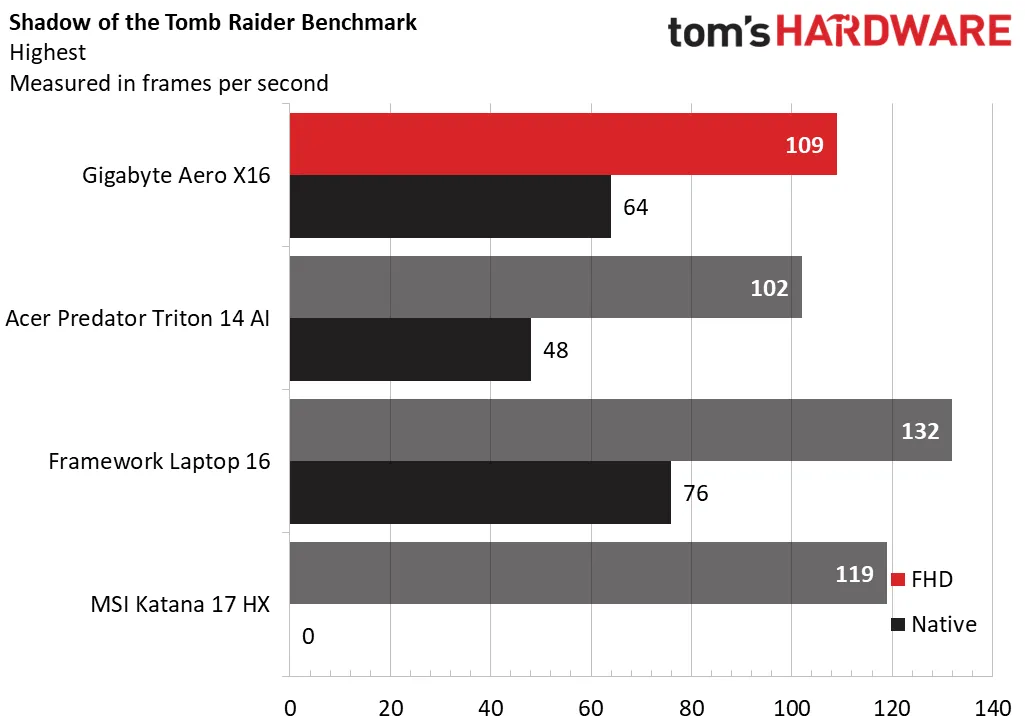
In Shadow of the Tomb Raider (Highest detail preset), the Gigabyte’s 109 FPS at 1080p compared favorably to the Acer (102 FPS) but trailed the Framework (132 FPS) and MSI (119 FPS). The 64 FPS it achieved at 1600p naturally outpaced the Acer’s 48 FPS at 1800p, though the Framework remained the 1600p leader with 76 FPS.
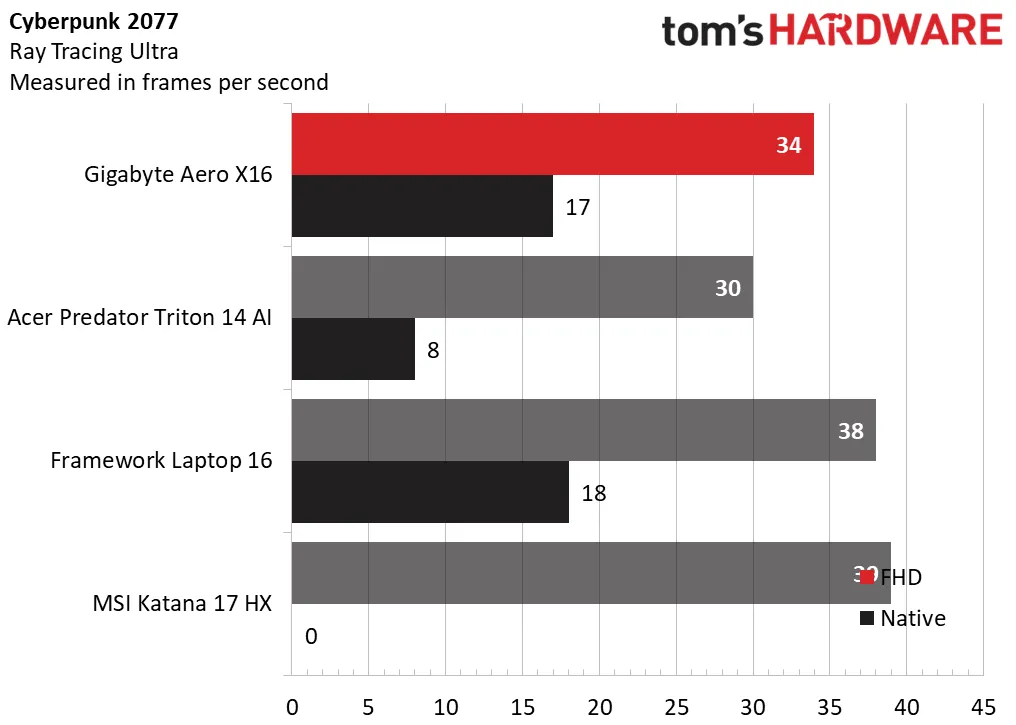
Testing Cyberpunk 2077 at its demanding Ray Tracing Ultra preset, the Gigabyte posted a just-playable 34 FPS at 1080p, edging out the Acer (30 FPS) but trailing the Framework and MSI by a few FPS. Native resolution proved too demanding, where the Gigabyte posted just 17 FPS, but it outpaced the Acer (8 FPS) and nearly matched the Framework (18 FPS).
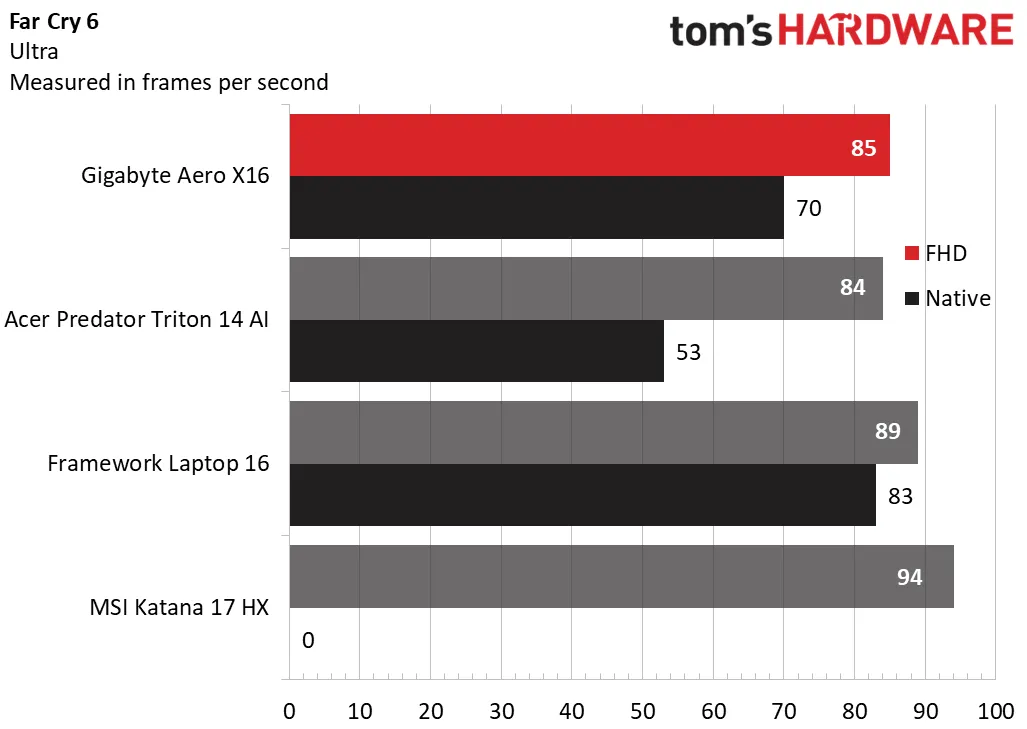
At Far Cry 6’s Ultra preset, Gigabyte’s laptop produced a competitive 85 FPS at 1080p, which was within a few FPS of the Acer and Framework, though it couldn’t catch the MSI (94 FPS). Its 70 FPS at native resolution was playable, much more so than the Acer (53 FPS). The Framework (83 FPS) remained noticeably faster.
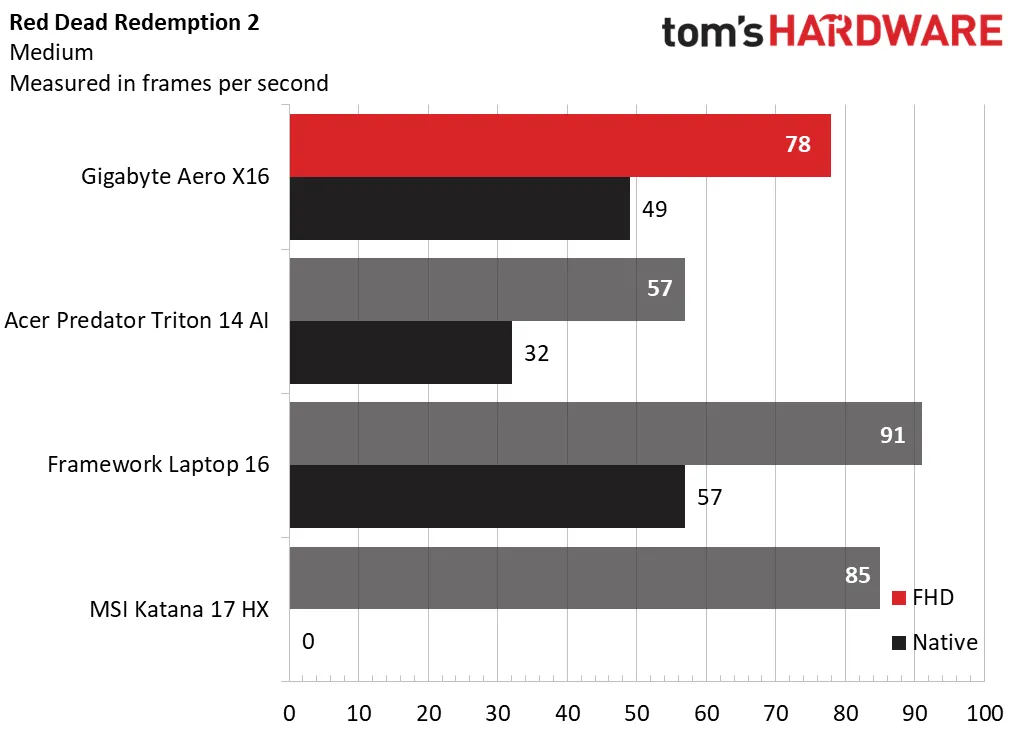
In Red Dead Redemption 2 at the game’s Medium settings, the Gigabyte’s 78 FPS at 1080p handily outperformed the Acer’s 57 FPS, though it continued to trail the Framework (91 FPS) and MSI (85 FPS). The gap narrowed at native resolution, with Gigabyte’s 49 FPS proving much better than Acer’s 32 FPS, but it wasn’t quite on the Framework’s level (57 FPS).
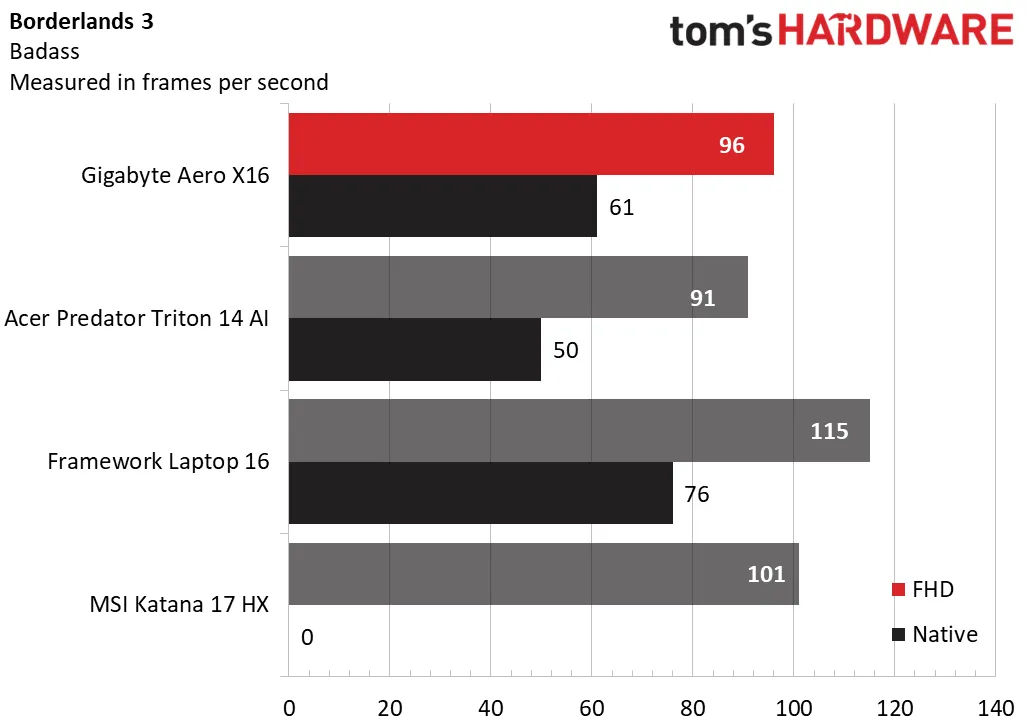
Finally, in Borderlands 3 at the game’s “Badass” settings, the Gigabyte’s 96 FPS at 1080p and 61 FPS at native outperformed the Acer (91 FPS and 50 FPS) but trailed the Framework (115 FPS and 76 FPS) and MSI (101 FPS).
This Gigabyte performs within expectations considering its RTX 5070 is tuned for 85 W, whereas the GPUs in the comparison laptops have at least another 15 W on tap. It’s nonetheless proficient for 1080p gaming and can handle 1600p, though some newer games might require reducing the visual quality settings for optimal performance.
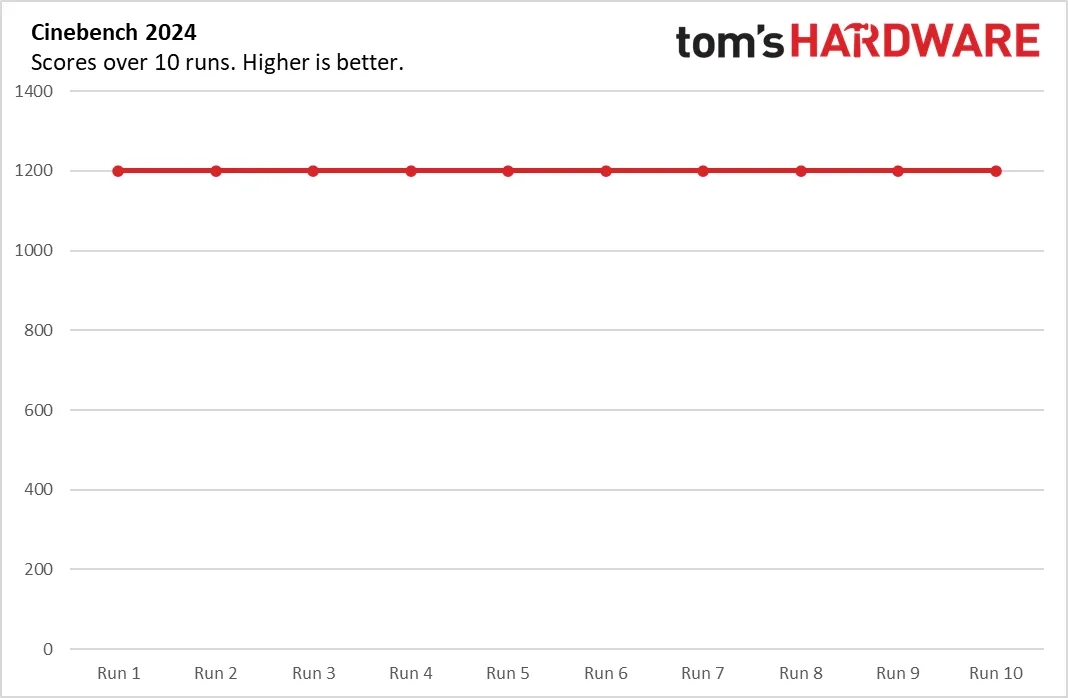
We stress test gaming laptops running 15 loops of the Metro Exodus stress test at RTX settings. During the test, the Gigabyte Aero X16 averaged 80.86 FPS across all runs, with an impressively minimal standard deviation of 0.22 FPS between runs, suggesting stable thermal performance. The Ryzen AI 7 350 had an average clocks peed of 2.76 GHz while the RTX 5070 averaged 1,928 MHz.
Productivity Performance on the Gigabyte Aero X16
Our Aero X16 review unit features an AMD Ryzen AI 7 350 processor, 32GB of DDR5-5600 RAM, and a 1TB SSD.
Image 1 of 3


On Geekbench 6, the Gigabyte’s Ryzen chip yielded the highest single-core score (2,916 points), just outpacing the Framework (2,878) powered by the same chip. It also led in multi-core, with 14,074 points to lead the next-best MSI (13,570) powered by a venerable Core i7-14650HX and more surprisingly, the Framework (12,399). The Predator Triton’s Ultrabook-class Core Ultra 9 288V landed it in last place (10,974).
The Gigabyte placed mid-pack in our 25GB file transfer test, with an average of 1,480.57 MBps. The Acer and MSI barely managed over 1,200 MBps while the Framework’s 1,724.69 MBps was clearly the fastest.
Our 4K to 1080p Handbrake video transcoding test was another win for the Gigabyte, which it completed in 3 minutes and 54 seconds, again leading the Framework (4:18). The MSI was just behind (4:30) while the lightweight Acer took 6:03.
Overall, with the Ryzen AI 7 350 on tap, the Aero X16 provides ample performance for most productive and creative tasks.
Display on the Gigabyte Aero X16
Gigabyte’s IPS screen has a 2560 x 1600 resolution, anti-glare surface, and a 165 Hz refresh rate with adaptive sync support. Its picture leans more towards serviceable than eye-popping, with brightness that’s adequate but not noteworthy. Colors have adequate saturation but lack the pop you’d get in an OLED or mini-LED panel.
Watching Star Wars: Return of the Jedi, I noted deep if not inky blacks in space scenes and convincing flashes from blaster bolts and explosions in firefights. Endor’s rugged forests had plenty of color. I was left with the sense that this display is of the minimum quality for a laptop in this class. A better display would significantly improve its appeal.
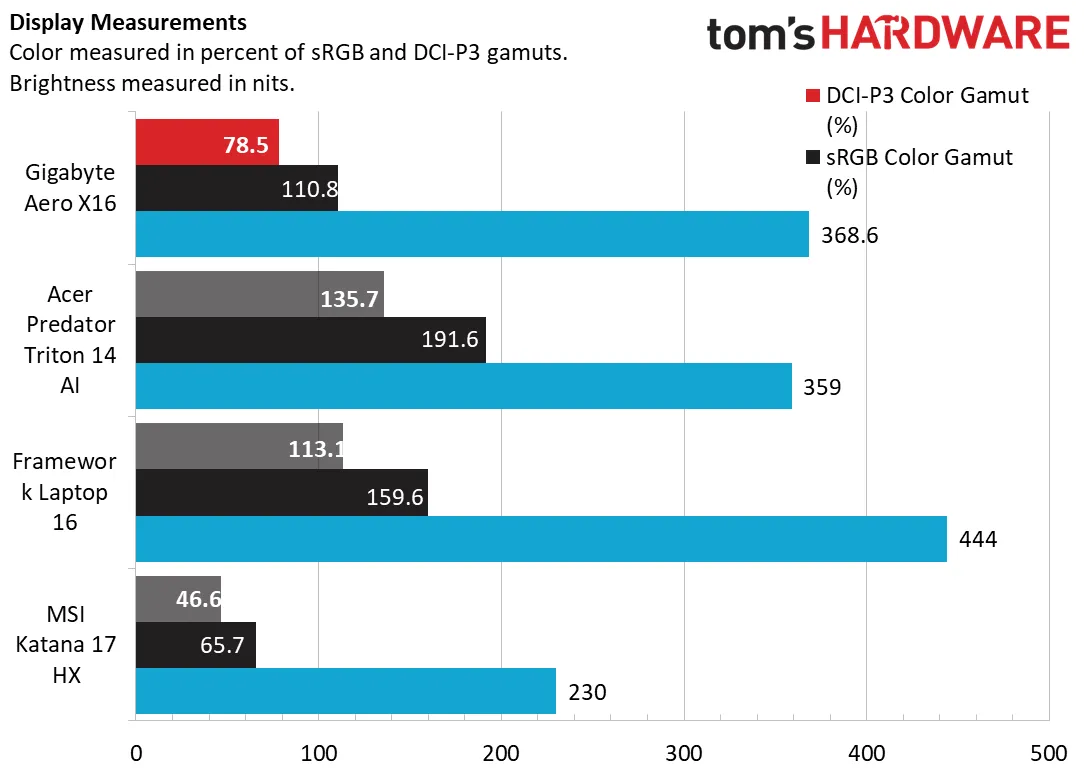
The Gigabyte unsurprisingly outperformed the budget MSI gamer in all metrics, particularly color, with 78.5% of DCI-P3 to MSI’s 46.6%. Its peak brightness of 369 nits slightly exceeded the Acer (359 nits), though the Acer uses an OLED panel that appears brighter than IPS at similar ratings. Acer’s panel was far more colorful, with 135.7% DCI-P3 coverage. The Framework system also outperformed the Gigabyte, with superior DCI-P3 coverage and an impressive 444-nit brightness. Overall, given Gigabyte’s creative focus, lack of full DCI-P3 coverage hurts it.
Keyboard and Touchpad on the Gigabyte Aero X16
Typing on the Aero X16 is comfortable, with a healthy 1.7 mm of key travel and sufficient cushioning at the bottom of the keystroke. Tactile feel is average, without much feel during the keystroke and not enough spring at the bottom to make it feel exciting. Nonetheless, I nearly matched my peak typing speed in my MonkeyType run, hitting 126 WPM with 99% accuracy.
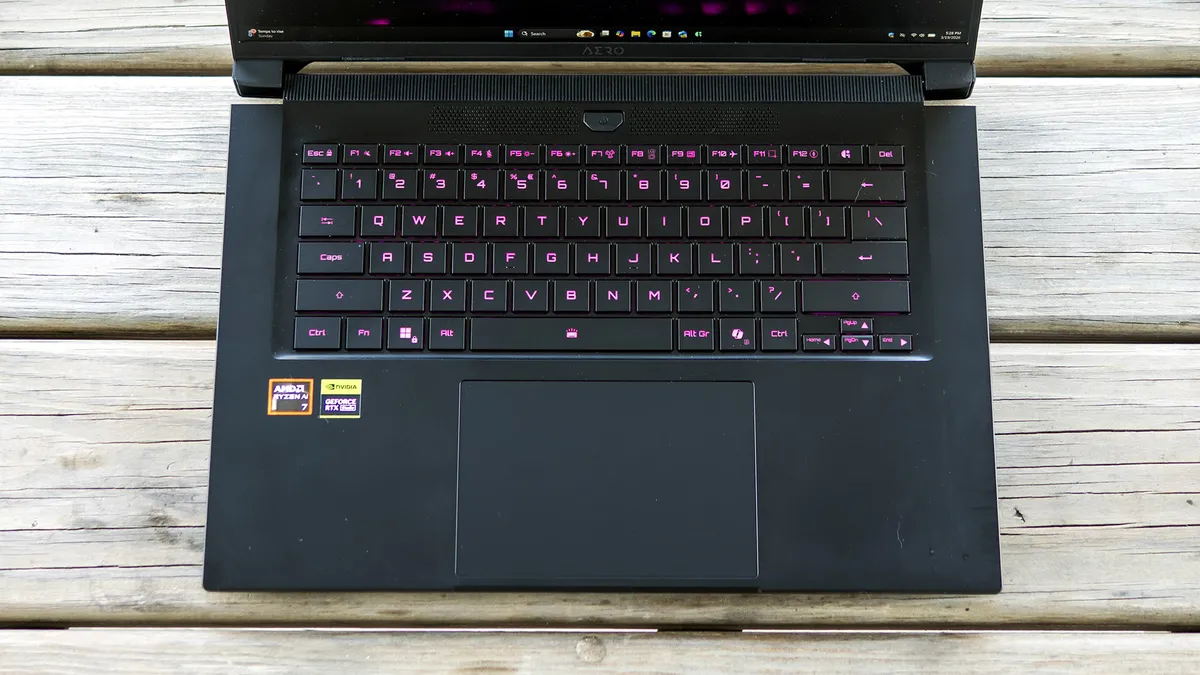
The single-zone RGB backlight works well in the dark. One zone at this price isn’t impressive, but some leniency can be granted given this isn’t purely a gaming laptop. The backlighting can be changed in the RGB Fusion app, with some patterns available like color cycling and breathing.
The expansive surface and responsive tactile feedback from the touchpad make it a joy to use. It’s slightly indented into the palm rest, giving your fingers a clear barrier. The touchpad can be disabled with Fn + F9.
Audio on the Gigabyte Aero X16
Audio quality is a weak point for the Aero X16. Listening to Lockbox’s “Something Bout You”, I noticed muddy details and a lack of instrument separation, compounded by distant vocals and minimal bass. Though the laptop includes Dolby Atmos, the equalizers didn’t help much, including my go-to Balanced preset. Volume is also barely adequate — you might be able to watch a movie or show or play a game in a quiet room, but the immersion factor isn’t there.
Upgradeability of the Gigabyte Aero X16
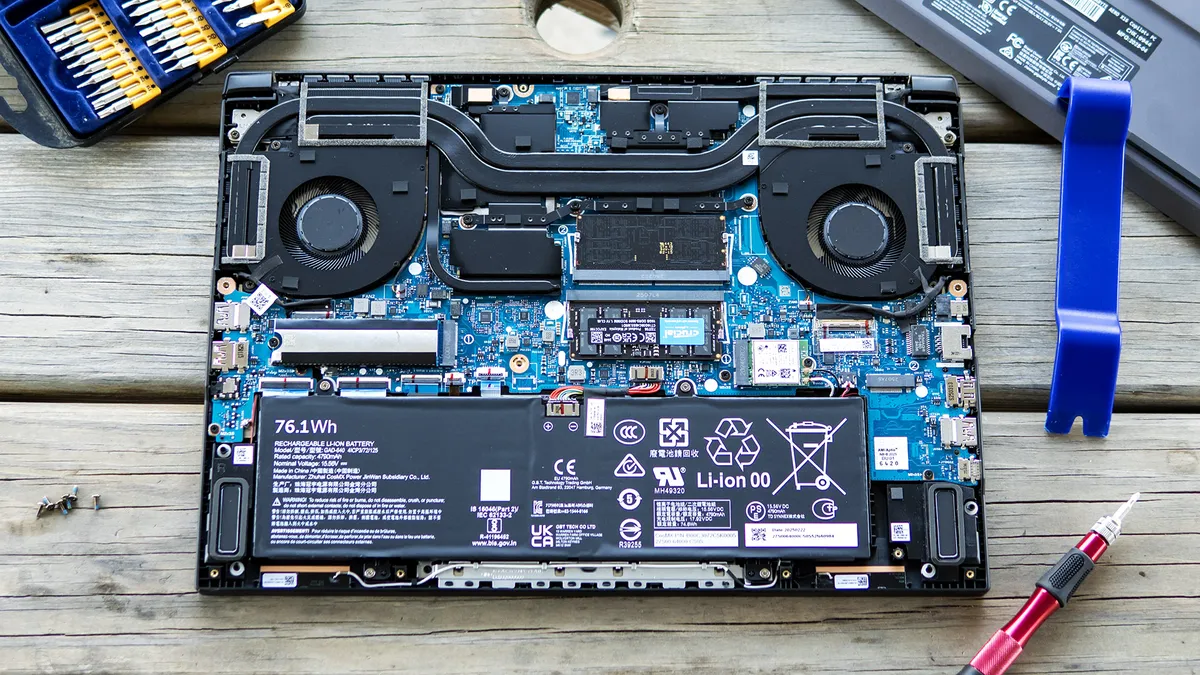
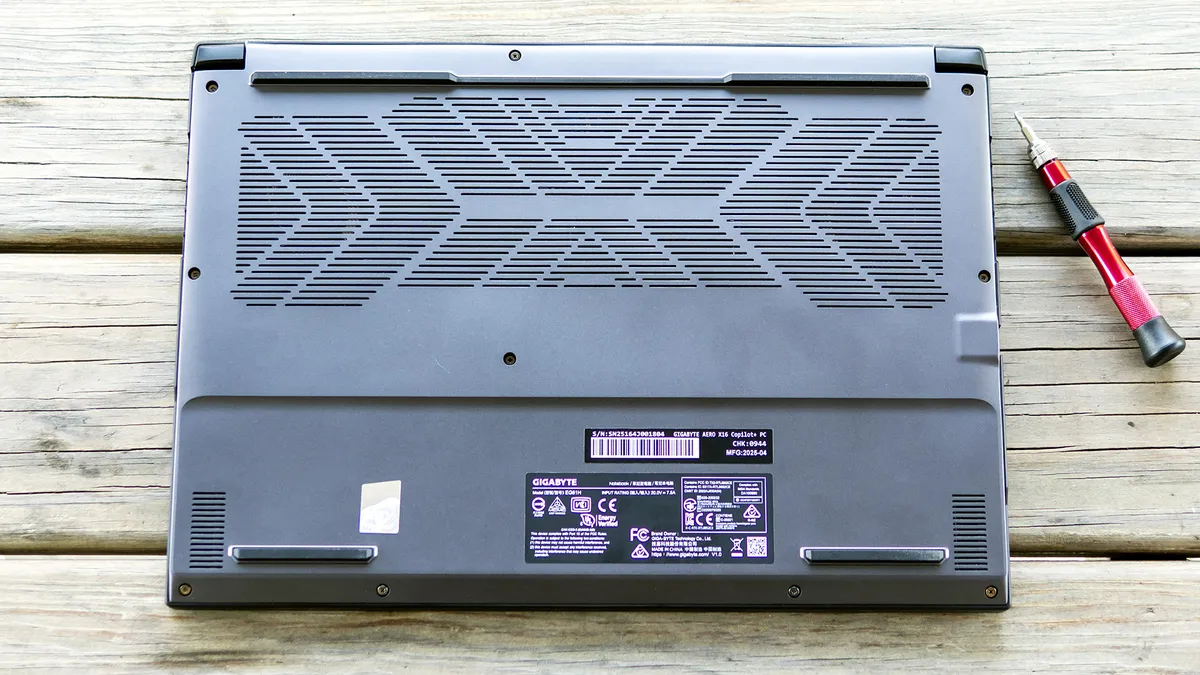
The Aero X16 is about as upgradeable as laptops get, with two SODIMM memory slots, two M.2 2280 drive slots, an M.2 2230 wireless card, and a removable battery. These can all be accessed under the bottom panel once the 10 Philips-head screws are removed, all of which are the same length. I used a plastic trim tool to pop the clips on the bottom panel, starting near the display hinge cutouts and working my way along the back edge and sides.
Image 1 of 2
Battery Life on the Gigabyte Aero X16
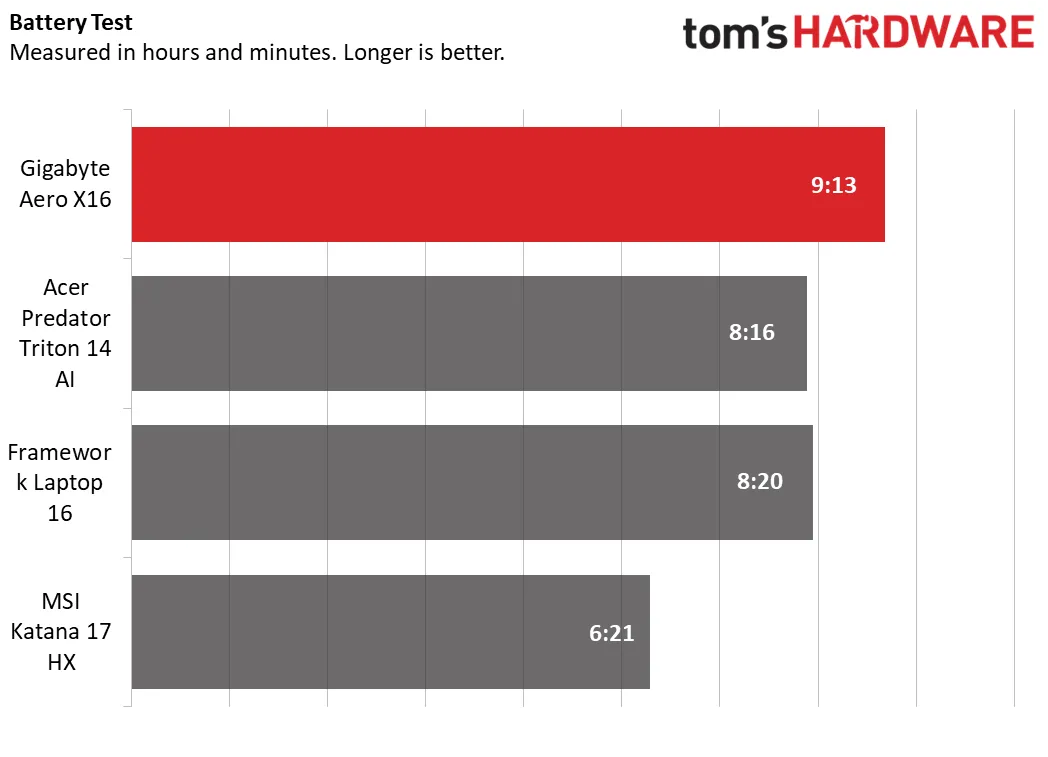
In our battery test, which includes web browsing, video streaming over Wi-Fi, and OpenGL workloads at 150 nits, the Aero X16 led the group, lasting 9 hours and 13 minutes. The Acer (8:16) and Framework (8:20) placed about an hour behind, and the MSI landed well back (6:21).
Gaming laptops don’t have the best reputation for battery life, so it’s nice to see a full workday here.
Heat on the Gigabyte Aero X16
Gigabyte’s cooling system uses two fans that exhaust from the sides and rear. I noticed almost no noise for everyday tasks. Fan noise is audible while gaming, but isn’t enough to be a distraction; the built-in speakers easily overpowered the noise.
The cooling system kept the Aero X16’s surface temperatures within acceptable ranges during our Metro Exodus stress test, where we measured peaks of 71 degrees F on the touchpad, 95 F between the keyboard G and H keys, and 114 F on the bottom towards the rear edge. Internally, the Ryzen AI 7 350 averaged 58 degrees Celsius while the RTX 5070 ran at 68 C.
Webcam on the Gigabyte Aero X16
Gigabyte’s center-mounted webcam offers an average picture. It sports the expected 1080p resolution, though details remain soft particularly in lower lighting conditions. Noise reduction appears to be excellent, with minimal graininess until lighting deteriorates, though the aggressive tuning here likely mutes details. There’s no privacy shutter, but there is an IR sensor for facial recognition logins with Windows Hello.
Software and Warranty on the Gigabyte Aero X16
The only significant app included on the Aero X16 is GiMATE, which provides basic system settings including battery charge mode (full or options to limit at 80% or 60%) and, interestingly, toggles for the battery status and power indicator LEDs. The app also has a hardware dashboard and provides system updates. Available power profiles include balanced (the default), gaming, creator, power saving, and online meeting. These are all well explained in the Scenario Profile Setting section, and can be customized. For instance, Game Mode prioritizes CPU/GPU power and network traffic for your game; meeting mode enables presence detection (automatically locking your laptop when you walk away) and uses the webcam to detect onlookers; and power saving even disables keyboard backlighting. Its real pitfall is that users must manually switch between these modes, which they will most likely forget to do. Balanced worked well for nearly all my testing.
GiMATE also includes some AI features; you can bring up a prompt using the keyboard shortcut and give it basic commands. As an example, I used “disable keyboard backlight”, and that worked, automatically sending the requisite command to the RGB Fusion app. Using “enable keyboard backlighting” turned it back on. This was surprisingly useful and a good feature for users who don’t want to hunt through menus for basic settings.
GiMATE also includes a Creator app, which connects to Hugging Face and lets you use various image to image and text to image models locally. It’s useful if you have an offline need to use this, though only certain models are available, and it’s not a truly unique feature. That said, it does simplify downloading the models and provides a consistent interface for them, a thoughtful touch if you want to try a bunch without needing to learn a new interface each time.
Gigabyte Aero X16 Configurations
Our Gigabyte review sample features a Ryzen AI 7 350 processor, GeForce RTX 5070 GPU, 32GB of RAM, and a 1TB SSD. It retails for $1,899 through B&H Photo and Video, though Newegg had what appeared to be the same model for $1,739, making it worthwhile to shop around.
Other configurations start at $1,499 with a GeForce RTX 5050 and 16GB of RAM, with an RTX 5060 model available on Newegg for $1,549 at review time. Both B&H and Newegg listed an out-of-stock notice for a model with our review specs but an uprated Ryzen AI 9 HX 370 chip; expect to spend a few hundred more for it should it come back in stock.
Bottom Line
Gigabyte’s Aero X16 is a reasonable attempt at straddling creative and gaming duties. It gets the core concepts right, including solid productivity performance, decent battery life, comfortable input devices, and welcome upgradeability.
However, some shortcomings keep the Aero X16 from joining the top ranks. The most limiting is its display, which is serviceable for everyday use but misses the creative mark with incomplete DCI-P3 coverage and modest brightness. Weak speakers don’t help its expressive ambitions, and the reliance on Wi-Fi 6E and USB 2.0 give the machine a slightly dated feel. And while the RTX 5070 is capable, gaming performance trails far cheaper alternatives, making the Aero X16 a tough sell for those prioritizing framerates.
Overall, the Aero X16 feels less like a hybrid and more like a compromise, competent in several areas but not exceptional where it counts. Creators willing to spend more will find a far better display in the Framework Laptop 16, which boasts even more upgradeability, while budget-minded gamers can get stronger performance from systems like MSI’s Katana 17 HX. The Aero 16 X16 has its merits, but at this price, the competition simply plays its cards better.