Demand for Apple’s Mac Mini has skyrocketed, particularly in China, as the small computer has become an ideal platform for experimenting with autonomous AI agents like OpenClaw and others. Now, a company called Astropad is building out a remote desktop solution specifically for this use case.
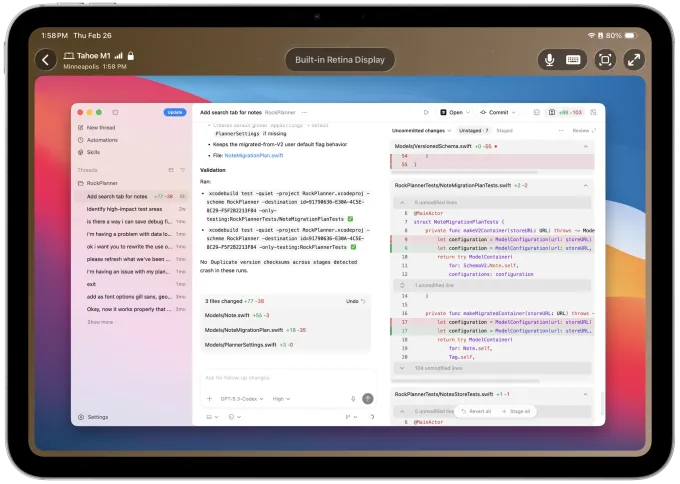
On Tuesday, Astropad CEO Matt Ronge introduced Astropad Workbench, a remote desktop solution for Apple devices that he pitches as made “for the AI era.”
While an AI agent running on a Mac Mini may not need a screen, its operator (the human) will want to log in at times to see what’s happening in order to check logs, monitor outputs, or restart stuck tasks, he says.

The new remote desktop solution offers a variety of features, including high-fidelity streaming; the ability to dictate prompts and commands with your voice; plus support for other input methods like the keyboard, Apple Pencil, or touch; and clients for both the iPad and iPhone — the latter essentially putting the remote desktop solution into your pocket for on-the-go access.
If you’re running AI agents across multiple Macs, Workbench offers a device chooser so you can move between them.

The idea came about because it was something the team at Astropad had wanted for themselves, as had their friends.
“We have heavily adopted AI at Astropad, and we’ve been using agents. And sometimes, you have an agent running on a long task, and you want to check on it,” says Ronge. “There’s not a great way to do this…there were existing remote desktop tools, but nothing built specifically for this,” he continues. “There have also been ways where you can use a terminal, or there are things like Telegram chats, but they’re limited. I mean, there are times you’ve got to see what’s happening on your Mac. You’ve got to approve a dialog or save something, or just visually see what’s happening.”
Workbench also leverages the company’s proprietary, low-latency display protocol, which it calls LIQUID, which supports the workflows creative professionals use. It retains full fidelity, even at Retina resolutions, Astropad claims, and doesn’t blur lines or pixelate data. The protocol already powers Astropad’s other products, like Luna Display, which turns your iPad into a second display, and Astropad Studio, which lets you use an iPad as a professional drawing tablet.
While monitoring an AI agent may not always need a high-fidelity solution, Ronge points out that it’s something that’s nice to have — especially if you’re approving designs or mock-ups your AI agent made.

Of course, remote desktop software has existed for some time, meaning Astropad has well-established rivals like Jump Desktop, RustDesk, AnyDesk, Parsec, VNC-based solutions, and many more.
But Ronge suggests that those weren’t designed for the specific needs of using remote desktop software to keep tabs on AI agents. With Workbench, it’s easy to check on the status of logs to see your AI agents’ progress in order to spot issues, restart stalled jobs, and make other changes, but what’s more, you can do this from your iPhone or iPad.
“We’ve been doing iPad stuff for years — it’s been, like, our whole company for the past 10 years. So we have a lot of experience in making good iPad apps,” Ronge says. “We know how to make good iOS apps…so we did that, and then we also added a voice model.”

The tech uses Apple’s voice model so you can talk to your phone and direct your AI agent to do something with a press of the microphone button.
“It’s a very natural way to work with agents. That’s the kind of feature that existing remote desktop [apps] just don’t have — they’re built for more traditional, enterprise-style remote desktop.”
As a new release, there will still be some bugs and polishing needed, but the team is continuing to work on the product. Next up, they plan to launch Windows and Linux support and refine the iPhone app.
The new software runs on macOS 15 and up and iOS 26, and is available as a free download offering 20 minutes of access per day. For unlimited access, the cost is $10 per month, or $50 per year.
Astropad, a bootstrapped and profitable small tech business, has over 100,000 customers, including those who have bought its iPad hardware accessories and its software. With Workbench, Ronge believes the company has the potential to reach both AI enthusiasts and businesses as remote support for AI agents becomes more common.
“I totally think businesses are gonna buy it. I mean, just the productivity gains I’m seeing from it myself — this is totally headed to businesses. It’s just too powerful,” he notes.