There is good news for the Honor Magic 7 Pro global users as the feature-rich MagicOS 10.0 upgrade has reached their doorstep. The update has arrived with loads of improvements over the previous software version and a variety of new features.
Up to this point, MagicOS 10 has been rolling out in China. The company has been serving the latest upgrade to its flagships and mid-range phones as well as tablets.
Meanwhile, some foldable phones and old flagships are still running in the beta phase. Ahead of that, it looks like Honor is pushing the Android 16 upgrade globally.
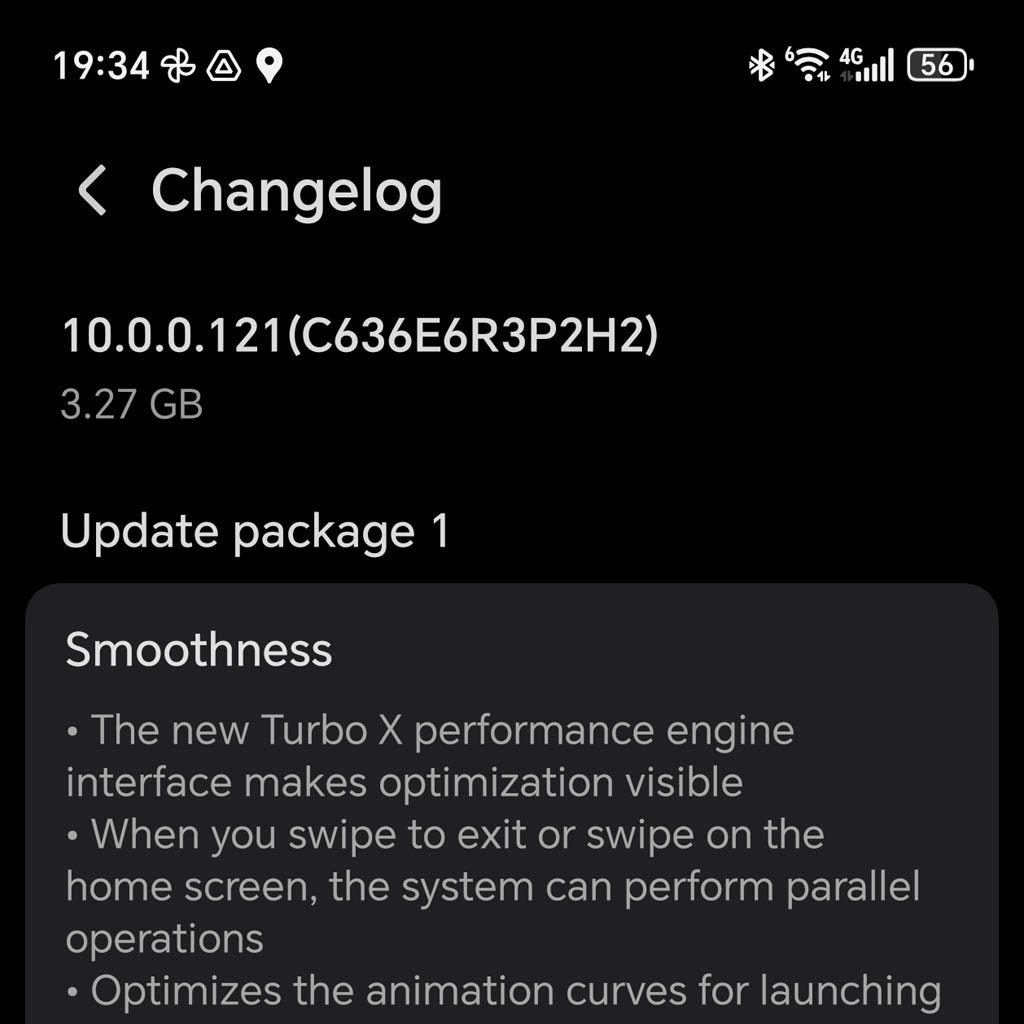
Honor Magic 7 Pro global units are now getting the MagicOS 10 upgrade with the 10.0.0.121 version. Users need to ensure sufficient space in their devices to install the firmware, as the software package weighs around 3.27 Gigabytes.
In terms of enhancements, the MagicOS 10 upgrade brings new features related to the home screen, lock screen customizations, call translation, and more.
Users will also be able to share files and media content with iPhone users without any external equipment or third-party applications. The OEM has further enhanced the Magic Capsule and other AI features. You can check all these features below.

(Image Credits: HCNewsroom)
MagicOS 10 Update: Changelog
Smoothness
- The new Turbo X performance engine interface makes optimization visible.
- When you swipe to exit or swipe on the home screen, the system can perform parallel operations.
- Optimizes the animation curves for launching or exiting apps, delivering a more fluid and comfortable experience.
- Improves the Camera performance for smoother usage.
- Improves the typing experience with a more responsive keyboard.
Convenience
- Integrated charging and screen recording into Magic Capsule for viewing real-time status and quick access.
- AI screenshot can intelligently learn from your usage scenarios and habits to automatically recommend the services you need, making operations simpler.
- You can take a screenshot that includes a floating window and easily select the floating window area in one step.
- After editing a screenshot, you can save it to replace the original image.
- Supports Bluetooth LHDC 5.0 high-definition audio codec.
- Motion Sickness Relief now includes an auto-enable feature during driving, and you can customize the dot color. Try it out by going to: Settings > Accessibility features, Motion Sickness Relief.
- Supports Android’s native extra dim mode, which reduces the white point value. Path: Settings > Accessibility features > Accessibility > Extra Dim.
- New voice search and fuzzy search features make searching more convenient.
New interaction
- The upgraded interface design delivers a new look for the OS.
- The refreshed Control Center includes a dark background to improve visual hierarchy and colorful icons for a more vibrant interface. It also supports personalized adjustments for a better user experience.
- Long take animation enables smooth transitions across pages for Clock and Gallery cards, as well as within Notes.
- When pressing home screen widgets or the Control Center, you can experience responsive effects.
- A tactile light effect responds to your tap on the password unlock screen and in Control Center.
- The lock screen offers more clock styles. Pinch with two fingers on the lock screen, tap Custom, then tap the clock to edit.
- Optimizes the widget set flipping effect.
- Transparency mode optimizes the transparency effects of elements such as widgets and folders, delivering an exceptional visual experience. Path: Settings > Home Screen & Style > Home Screen Settings > Transparency mode.
Explore the home screen
- The media control widget features a progress bar, allowing you to easily adjust the playback.
- You can swipe horizontally from anywhere in the Control Center to quickly switch to the Notification Center.
- Improves the display of third-party app notification icons in the status bar for a more unified look.
- The home screen now enables a dock background. Path: Pinch with two fingers to access home screen editing > Settings > Dock.
Communication and Social
- The call translation feature is now available. Path: Settings > Honor AI > Call Translation.
Media Creation
- Refreshed the Camera interface to make it more convenient to use.
- Imaging menu allows you to view items in two rows, and you can swipe to turn pages. To access the imaging menu, go to Camera and swipe up the bottom arrow.
- You can customize the functions displayed in the Camera’s status bar. Path: Camera > Settings > Customize status bar.
- You can now quickly browse videos and easily locate specific frames in Gallery.
Honor Connect
- Simply tap your device against an iPhone to transfer files. Ensure that the Honor Connect app (v1.1.18111 or later) is running on the iOS device.
- Install HONOR WorkStation on your macOS or Windows computer to easily transfer images, videos, and files between your Honor device and the computer.
- OneTap enables seamless file transfer between Honor devices, combining speed with ease and fun. Path: Settings > More Connections > One Tap
System
- Update to enjoy the system optimizations.
The post Global Honor Magic 7 Pro receives MagicOS 10 software upgrade appeared first on Huawei Central.