HarmonyOS 6 API 23 developer beta version is out with several useful functions, one of which is lock screen widgets for Huawei smartphones. It is capable of supporting various capabilities like standby screen savers and lightweight interaction.
According to the information, the new addition for Huawei smartphones is named feature widgets (lock screen card). It displays a 2 x 2 layout on the lock screen.
Besides, the new widgets expand support to more capabilities. It can now support standby screen savers. It’s a custom AOD on the lock screen that appears when the device is locked, charging, or kept horizontally.
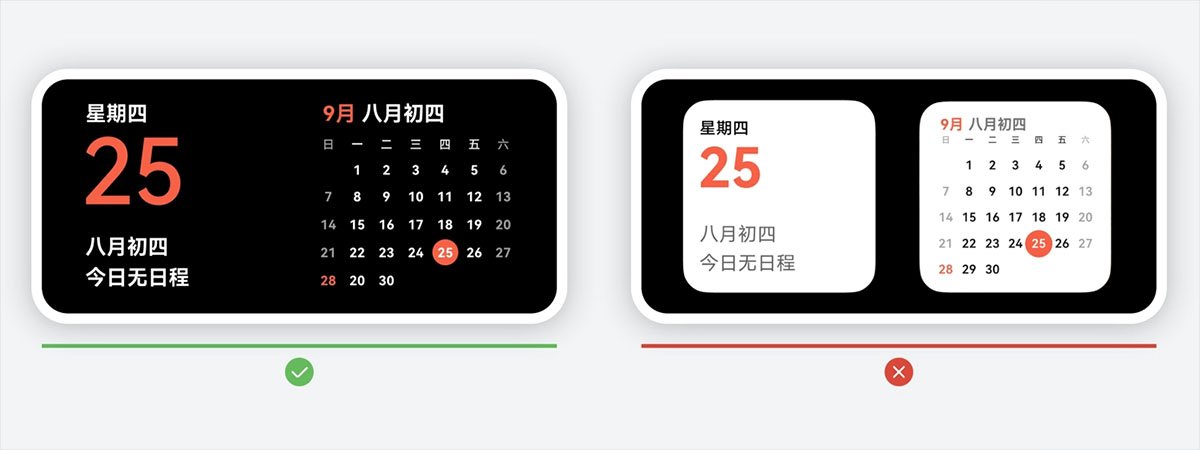
When in standby mode, the device’s system will automatically display two 2 x 2-sized widgets, enlarging them to fill the lock screen. The benefits of this feature are:

(Image Credits: Huawei)
1. Clearly Visible: Users primarily browse from mid to far distances, so please pay attention to information presentation to ensure the details can be easily viewed from a considerable distance.
2. Immersive Visual Experience: Utilize a rich and varied color palette to seamlessly integrate widget content into the environment, providing users with an immersive experience. Avoid using large areas of overly bright light colors, which can create a sense of visual discontinuity.
3. Lightweight interaction: Supports lightweight interaction and makes reasonable use of animation effects to enhance the experience.

(Image Credits: Huawei)
Users can easily enter edit mode by pinching or long-pressing with two fingers in standby mode, allowing them to add or remove widgets. Note that you don’t have to swipe left/right or up/down within the widget.
One can further refresh the widget to see impressive animations. Also, when the background image or back panel changes, it will show a slight gradient effect to ensure the stability of the widget.
The post Huawei brings new ‘lock screen widgets’ to its smartphones appeared first on Huawei Central.