The wait is over as the standard Huawei Watch GT 5 is finally getting the latest HarmonyOS 6 upgrade in the global market. While the Pro variant has already received the ultimate update, it’s the turn of the vanilla version to enjoy new offerings.
Huawei has expanded HarmonyOS 6 for many smartwatches in the global markets to date. The list includes Watch 5, Watch GT 5 Pro, Watch D2, and Watch Fit 4 Pro.
At the same time, Huawei introduced a new payment app for its dynamic smartwatches: CurvePay. It brings some really significant capabilities for wearable users.
In the current landscape, Huawei is bringing the HarmonyOS 6 upgrade to the Watch GT 5 vanilla model. And it seems that the company breathes new life into the wearable, tagged with a huge feature changelog and many useful improvements.
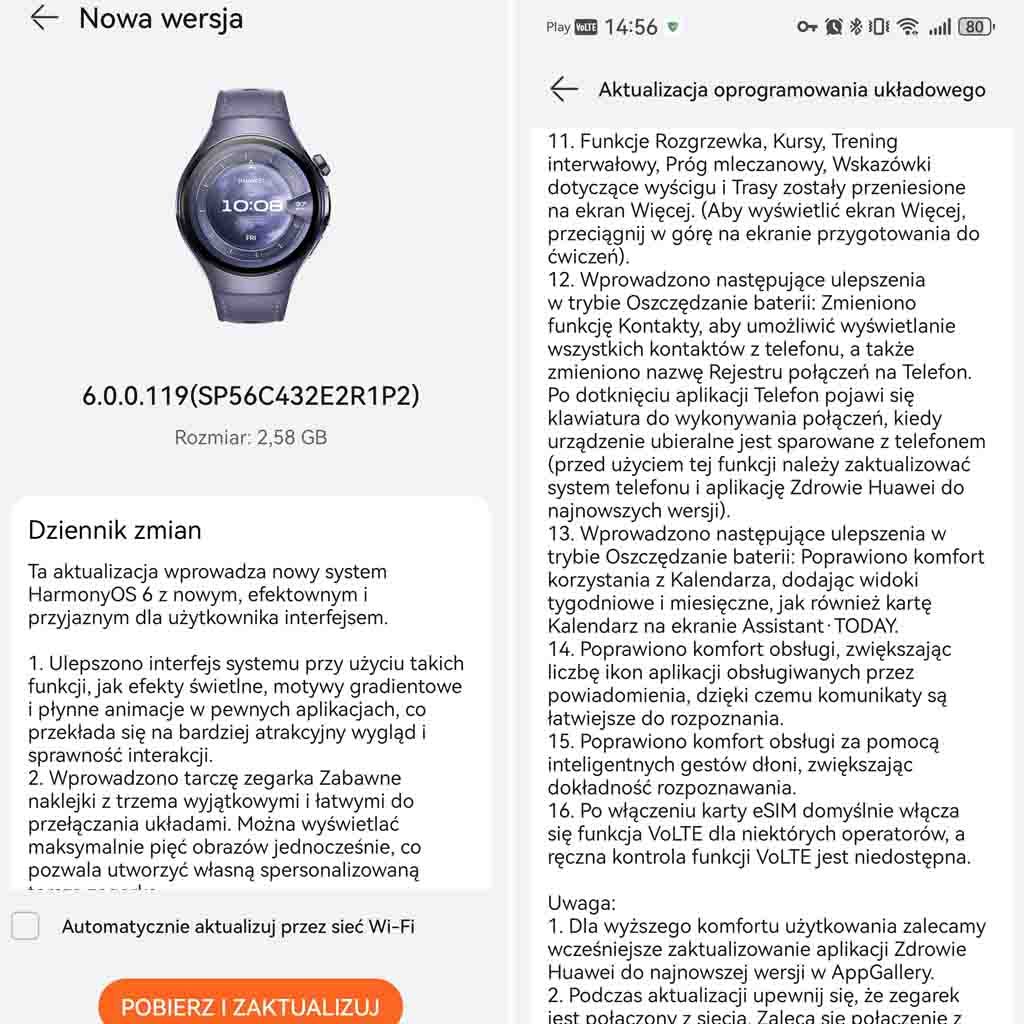
Huawei Watch GT 5 is getting a new software update with HarmonyOS 6.0.0.119 version and a package of 2.85GB. It is currently rolling out in Europe.
Watch GT 5 is getting new watch faces, fun stickers, improvements for the power-saving mode and battery saver, an enhanced Emotional Wellbeing app, and optimized gestures to control the wearable more efficiently. You can check these changes below.
Thanks to tipster – Pablo for this amazing tip!

(Image Credits: HCNewsroom)
HarmonyOS 6 Update:
- Improved the system interface with features like lighting effects, gradient themes, and smooth animations in certain apps, resulting in a more attractive appearance and smoother interaction.
- Introduced the fun stickers watch face with three unique and easy-to-switch layouts. You can display up to five images at a time, allowing you to create your own personalized watch face.
- Added the Huahua Cute Animals watch face, allowing you to view your emotional state anytime. It can be operated by touch, and you can also customize the display of data, such as the calendar, battery level, and health indicators.
- Introduced the 2025 modules watch face, which lets you mix and match widgets of different sizes and switch between different theme colors.
- Introduces a redesigned Emotional Wellbeing app, which lets you experience 12 different emotions based on your emotional state and stress level. You can also try breathing exercises guided by a charming pet.
- Adds the shortcut settings screen, accessible by swiping right on the workout screen. There, you can easily adjust the volume of workout reminders or change workout settings.
- Introduces the following improvements in battery saving mode: The Contacts app can now display all contacts on your phone, and the call log is renamed to “Phone.” Tapping the Phone app will display a keypad for making calls when the wearable is paired with your phone. (Update your phone and the Huawei Health app to the latest versions before using this feature.)
- Introduces the following improvements in power saving mode: Enhances the calendar experience by adding week and month views, as well as a calendar card, to the Assistant: TODAY screen.
Enhancements
- Enhances the system interface with features like lighting effects, gradient designs, and fluid animations in select apps for a more sophisticated and seamless visual and interactive experience.
- Allows you to adjust the vibration intensity for alarms (under Settings > Sounds & Vibration > Vibrate > Custom) and mute alarm notifications by simply covering the screen with your palm.
- Supports connectivity with heart rate monitors, speed sensors, power meters, and cadence sensors to meet professional fitness needs. (In standard mode, you’ll find the settings under Settings > Cross-Device Cooperation > Health Device Management, while in power-saving mode, you’ll find them under Settings > More Connections > Health & Fitness Devices.)
- Enhances the Golf Mode experience with stunning panoramic views of the fairways and vivid details of the greens. You can also effortlessly measure distances from any position, helping you pinpoint the location of the green and hazards.
- Improves the trail running mode, including an elevation graph that clearly displays elevation changes at your current location. It also offers segment-based navigation that guides you precisely through each segment, helping you manage your training like a Pro.
- Features such as warm-up, courses, interval training, lactate threshold, race guidance, and routes are moved to the “More” screen. (Swipe up on the “Training Preparation” screen to access the “More” screen.)
- Improves usability by supporting more app icons for notifications, making it easier to identify message sources.
- Enhances the user experience with smart hand gestures through increased detection accuracy.
- Enables VoLTE by default for certain providers after the eSIM is activated. Manual control of VoLTE is not available.
The post Huawei Watch GT 5 gets HarmonyOS 6 update with new features appeared first on Huawei Central.