HyperOS 3.0 unlocks many amazing features on Xiaomi phones, but have you gone through its customization tools? Well, if not, then you should definitely try some of the functions to personalize your handset and make it more interactive!
Xiaomi phones have got some really interesting customization features – all thanks to HyperOS 3.0, which comes with smarter AI tools and some fun home screen functions.
Generally, there are two ways to customize your Xiaomi phone‘s home screen. First is to change the icon size, and the second is to enhance the background. And these changes can happen in just a few taps. Let’s check them one by one.
Icon Customization:
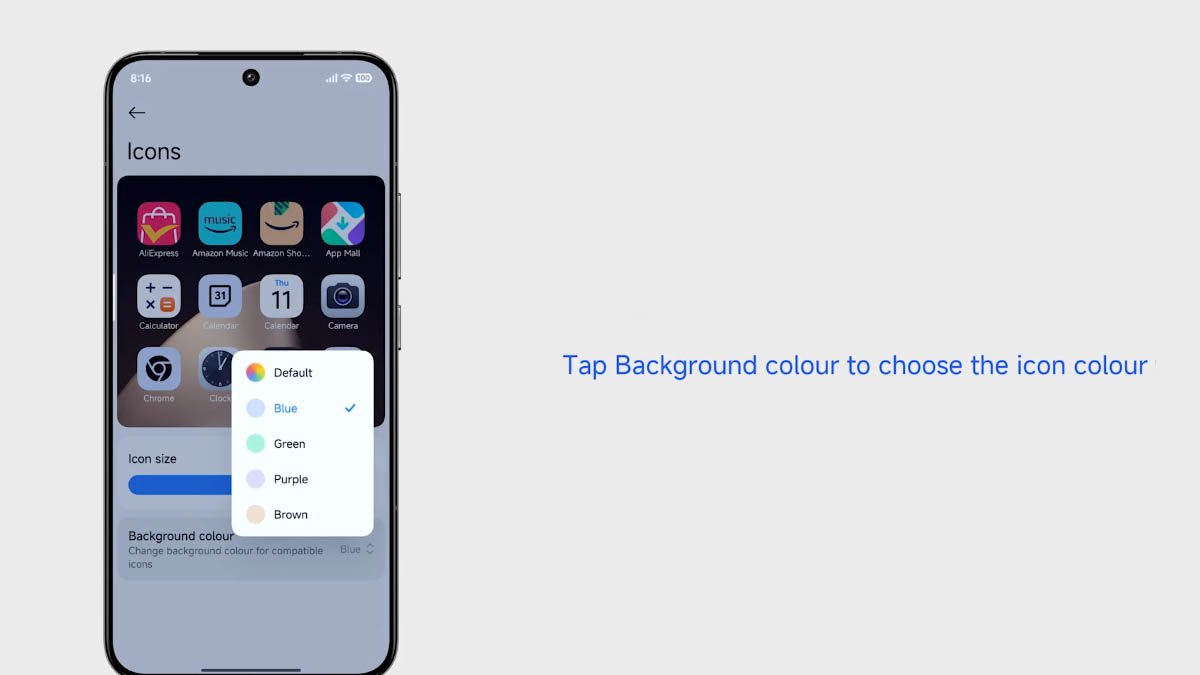
App icons play a significant role in making your home screen look pretty and attractive. While a larger size will help elders to easily identify the app, a medium size makes your screen look clutter-free. And you can do it by just:
- Open the Settings app on your phone
- Search for “Icons”
Here, you will see a size adjustment slider. This part will enable users to change the icon size accordingly. Use this icon size bar to alter the size (small or large) of the app icons that appear on the home screen. It also has a preview section.

(Image Credits: Xiaomi)
Background Color
The same section includes the background color option for the icons. You can choose the color you like for the icons. It will show you five options: Default, Blue, Green, Purple, and Brown.
Bonus tip: If your home screen appears cluttered, then pinch the home screen with two fingers to enter edit mode. Now shake to clean it up, and it’s done!

(Image Credits: Xiaomi)
The post You should try these customization features on Xiaomi phones appeared first on Huawei Central.