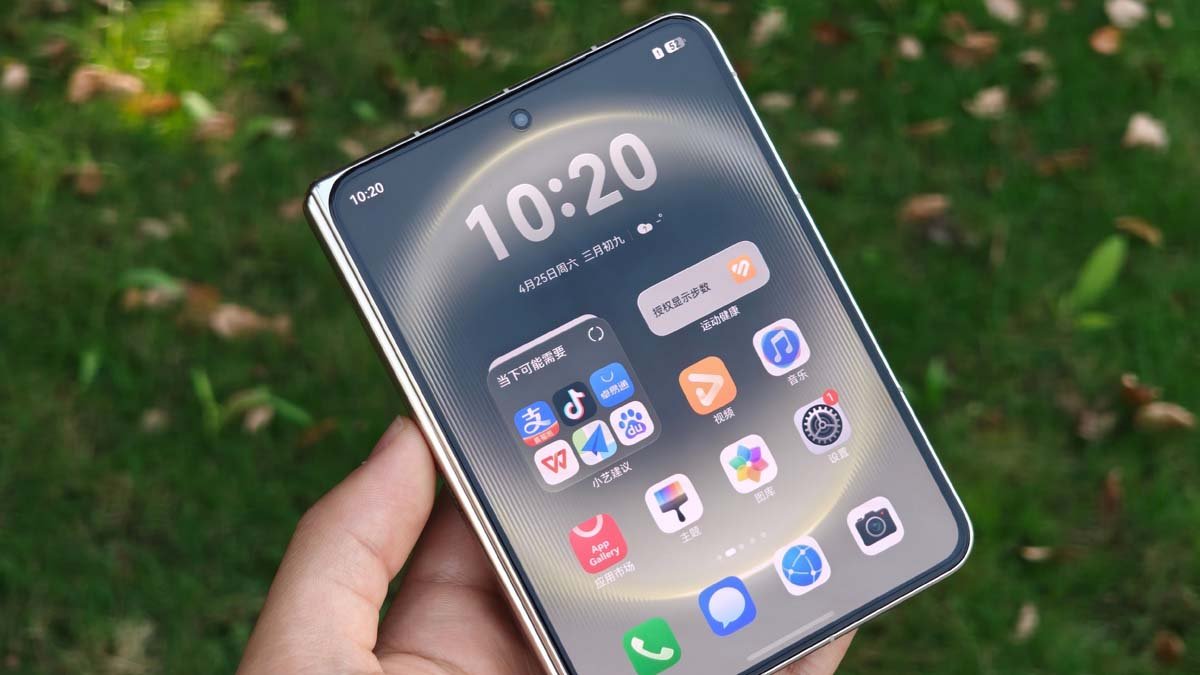
Huawei Pura X Max comes with a unique form factor and the company is now making the best use of this appearance by pushing a new tablet layout mode feature to the foldable. The latest addition is rolling out with the HarmonyOS 6.1.0.120 update.
Just like the feature present in many PCs, a tablet mode optimizes the entire user interface, making it behave more like a tablet rather than being limited to a traditional device. It simplifies the UI by running full-screen apps + increasing icon spacing.
Now the company is releasing this tablet layout mode for the Huawei Pura X Max, enhancing multitasking scenarios and boosting the overall productivity of the device.
According to the details, users can access the new tablet mode via the Settings app. Now select the Home Screen and Personalization section and open the Home Screen Layout option. Tap on “Tablet” and enable the respective mode.
Besides the new feature, Huawei has also pushed out a huge changelog which brings a new image editing app, drawing tools, Document Correction, and more. You can check all these features below.

(Image Credits: Weibo)
HarmonyOS 6.1.0.120 Update
Gallery
- The image editing app now features a sticker function. Enjoy various sticker sets, including Emojis and cute dance icons, and you can also add your own stickers to make photo editing more fun (Gallery > Image Editing > Stickers).
- Optimized the drawing function, supporting the direct addition of arrows, lines, squares, and circles, making annotation more convenient (Gallery > Image Editing > Drawing).
- Optimized text functionality, adding various decorative text and text box styles for more personalized expression (Gallery > Image Editing > Text).
- The Smart Album supports collapsing and hiding. Click the arrow on the right side of the Smart Album page to collapse or expand it, providing more flexible album management.
Camera
- The unfolded shooting mode supports AI-assisted composition. When shooting landscapes, people, architecture, and other scenes, the phone will automatically analyze the image and guide you to adjust when it identifies a better framing area or angle, helping you discover more wonderful compositions and easily capture cinematic-looking shots.
- Optimized dual-screen display function, allowing you to either set the external screen for synchronized viewfinder preview or display your preferred image.
- Added a new “Document Correction” mode, which can intelligently correct document photos taken at skewed angles (Camera > More > Document Correction).
- Optimized the display of some interfaces, including XMAGE Smart Shooting Mode.
System
- Added screenshot access service feature. When you take a screenshot, it will intelligently recognize the screen content and proactively provide you with direct access services such as creating a schedule, scanning a QR code, opening a browser, making a phone call, and sending an email. You can access these services with a simple tap of your finger, making it smooth, efficient, time-saving, and effortless.
- Added support for intelligent grip in unfolded mode. When enabled, the full-screen call button will intelligently adjust its position according to your grip on the phone. Whichever hand is holding the phone, the answer button will be on that side, making it more convenient to answer calls.
Themes
- Optimized the spatial sense of the background generated by the selected photo in the Bumper Park theme, enhancing the more natural collision effect between stickers and selected photos.
- Optimized the materials and styles of the preset backgrounds and 3D sticker elements in the Bumper Park theme to enhance their sophistication.
Home Screen
- Tablet mode: One can use it in two ways and enjoy a more immersive visual experience with a large screen.
The post Huawei Pura X Max receives a tablet mode with new update appeared first on Huawei Central.