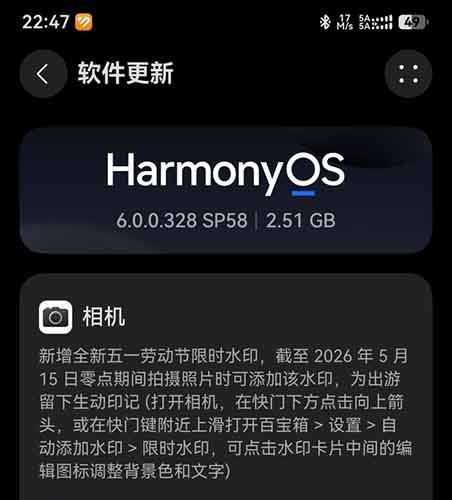
Huawei has launched HarmonyOS 6.0.0.328 SP58 for the Huawei Mate 60, 70, 80 series and Pura 60, 70, and 80 series smartphones. This HarmonyOS 6 version brings new features, including a limited-time May Day camera watermark, and other important additions. You may have noticed that the .328 version was already released for top flagships. However, Huawei isn’t done sending all of its latest features to users.
Below you can check the full changelog.
Camera
- A brand new, limited-time May Day watermark has been added. Photos taken untill the midnight on May 15, 2026 can be marked with this watermark to leave a vivid record of your trip (open the camera, tap the up arrow below the shutter button, or swipe up near the shutter button to open the toolbox > Settings > Auto Add Watermark > Limited Time Watermark, you can tap the edit icon in the middle of the watermark card to adjust the background color and text).
- Optimize the user experience of AI-assisted composition.
Image Gallery
- Added an artistic view feature. Clicking the artistic view button in the lower left corner of the photo allows for intelligent analysis of images and videos, curating them into albums by time. You can switch between day, month, and year views by pinching and splitting your fingers. The year and month views present albums of selected images and videos, while the day view artistically displays all images and videos.
- A new long-press multi-select feature has been added, which allows you to select multiple pictures or videos in the photo page or album by long-pressing. You can quickly select by sliding your finger, making batch selection more convenient (Gallery > Settings > Grid View Long Press Operation > Select “Long Press Multi-Select”).
- The gallery videos support multiple playback speeds from 0.25X to 2X. You can slow down the playback or browse quickly, and control the pace (video playback interface > click the video speed icon in the lower left corner to select the playback speed from 0.25X to 2X).
- Added a one-click album hiding function. Open the target album, click the four-dot icon in the upper right corner, and select “Hide this album” to hide the entire album with one click, making the operation more convenient.
Lock screen
- Optimize the preview effect when setting artistic signatures on the lock screen.
Multi-device collaboration
- Optimize the user experience of the communication sharing function in certain scenarios.
- Optimized the smoothness of music playback on the car’s infotainment system after the device is connected to the car’s Bluetooth.
Important system patches
This update optimizes system stability in some scenarios, and we recommend that you update.

Huawei HarmonyOS 6 update with May Day watermark
The post Huawei releases new HarmonyOS 6 features with May Day camera watermark appeared first on Huawei Central.