Huawei is bringing the Smart Grip feature for the Enjoy 90 Pro Max with the latest update. Alongside an intelligent tool, the company is adding new changes to AOD and has optimized certain existing display and camera capabilities of the device.
After announcing HarmonyOS 6.1 at the Pura 90 series launch event, the company began beta recruitment of this version for some top-end phones and tablets.
Devices like the Mate 80 Pro Max Wind Edition and the Enjoy 90 high-end variants are the first to gain HarmonyOS 6.1 beta, with a wide range of interesting features.
But some Enjoy 90 Pro Max users reported that the device isn’t in the first batch of HarmonyOS 6.1 beta. Hence, the company has pushed a new build to the entry-level PRO MAX smartphone with significant enhancements.
Inputs suggest the Huawei Enjoy 90 Pro Max is receiving the Smart Grip feature with the HarmonyOS 6.0.0.150 version. If you have not received the HarmonyOS 6.1 beta, then don’t worry. The latest version has everything you were looking for.
Smart Grip recognizes an incoming call or notification and uses sensors to determine which hand is holding the phone or where the thumb is resting. The call buttons automatically slide to rest directly under your thumb, making the reach easier.
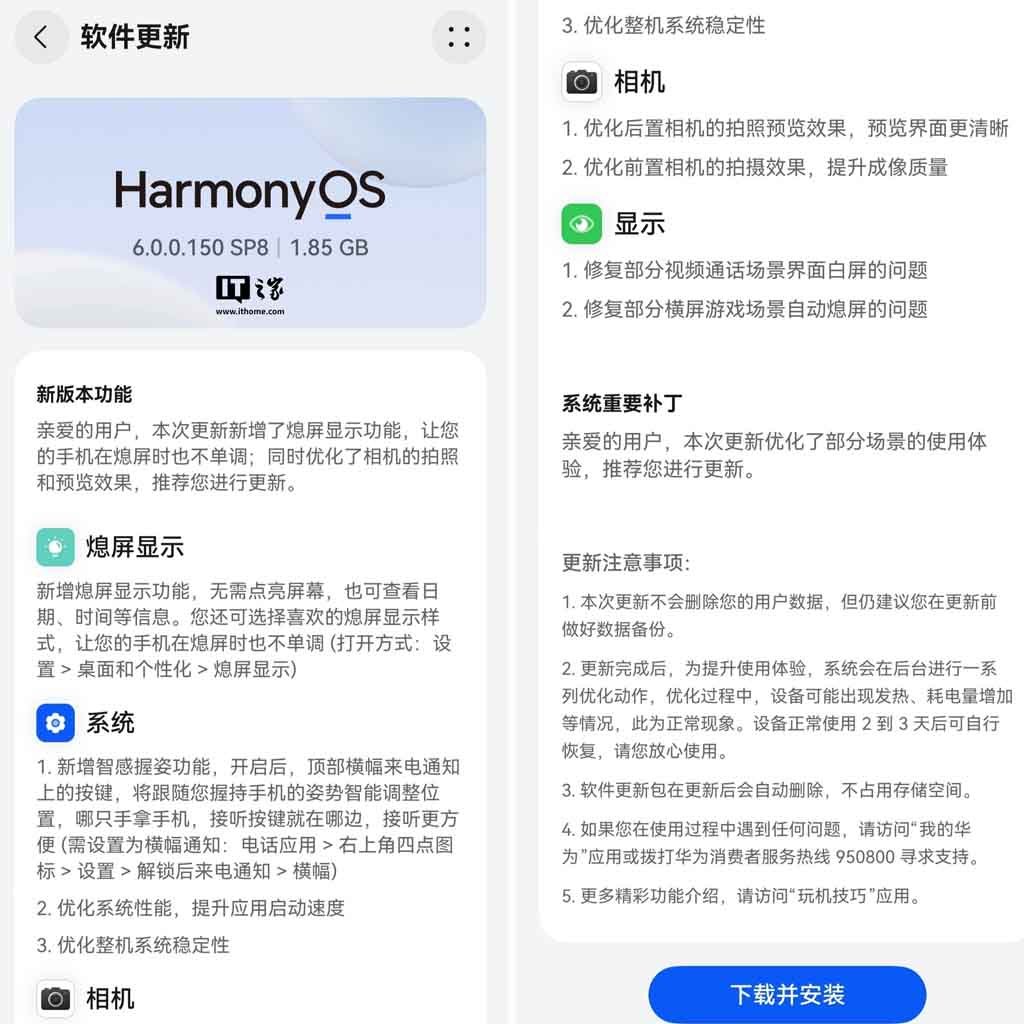
Apart from new features, Huawei has optimized the preview effect for the rear camera, shooting effects of the front camera, and fixed some display issues. You can check the details below.

(Image Credits: Huawei)
New Features
AOD
- Added a new Always-on Display feature that allows you to view information such as the date and time without turning on the screen. Choose your preferred AOD style to make your phone more visually appealing even when the screen is off.
- Path: Settings > Home and Personalization > AOD
Smart Grip
- Added smart grip feature. When enabled, the button on the top banner call notification will smartly adjust its position as per your grip posture. Whichever hand holds the phone, the answer button will be on that side.
- Path: Phone App > four-dot icon in the upper right corner > Settings > Call notification after unlocking > Banner.
Optimizations: System
- Optimized system performance and improved app startup speed.
- Optimized the stability of the entire system.
Camera
- Optimized the rear camera’s photo preview effect, making the preview interface clearer.
- Optimized the shooting effect of the front camera and improved the image quality.
Display
- Fixed the issue of a white screen in some video call scenarios.
- Fixed the issue of the screen automatically turning off in some landscape game scenarios.
The post Huawei Enjoy 90 Pro Max users receiving Smart Grip feature appeared first on Huawei Central.